25th February 2026: Studio v1.13.1 - Detail Views/Pages
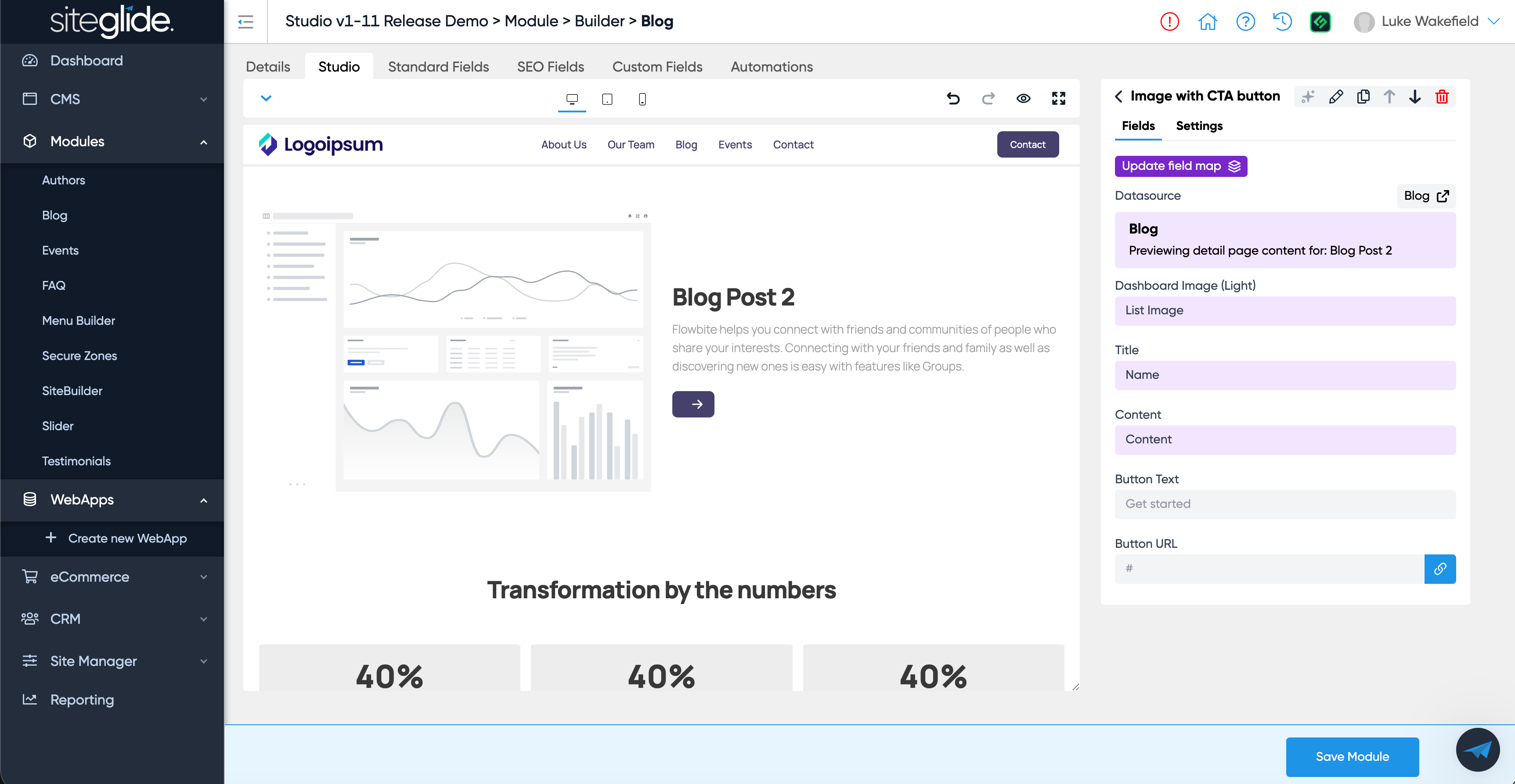
This is a big one! You can now build a dynamic website in Studio without touching code…
Setup and manage the Detail View for any WebApp or Module with Studio meaning you can use the library of existing sections and the familiar no-code UI to design your page.
Why not give it a spin?
Ensure you have a Site with the latest version of Studio installed (v1.13.1), we recommend starting from our Flowbite Free Studio Template site in Marketplace.
Then follow these steps:
Step 1: Select a WebApp or Module such as Blog or Events (or create/install one).
Step 2: Select and save a Studio Template in the Module/WebApp settings area.
Step 3: The Studio tab will then appear allowing you to select Studio Sections to use on your Detail View/Page.
Step 4: Once you insert a section that has Fields it will automatically be mapped to the current Module/WebApp (in this example the Blog).
Step 5: You can then click the purple ‘Update field map’ button to change the mapping of each field and very quickly customise your dynamic layout.
Step 6: You can also add static sections (or just static fields) as well as dynamic content from other areas of the Site for example WebApps or other Modules.
Full Docs and Guides to follow very soon but we wanted to get it into your hands asap!